
Smart Watches: The Complete Guide to Choosing the Right One
Smart watches have moved from a novelty gadget to a genuine health and productivity tool. Millions of people strap one on every morning. As of July 6, 2026, picking the right model is more confusing than ever. Dozens of competing brands, operating systems, and price points make the decision harder. Most first-time buyers don’t realize how differently an iPhone-only Apple Watch behaves compared with an Android-friendly Wear OS device. Similarly, few realize how a $70 fitness band compares with a $300 multisport watch.
This guide walks you through what a smart watch actually does. It also covers the sensors and features worth paying for, and how to match a model to your lifestyle, budget, and phone. If you’re curious about the science behind the numbers on your wrist, the CDC’s physical activity guidelines are worth a look. They offer a useful benchmark for your daily step and heart-rate data. By the end, you’ll be ready to explore our top-tested rankings and find the one that actually fits how you live.
- 5 models hands-on compared
- Every major ecosystem covered
- Budget to premium price tiers
- Battery life independently checked
Table of Contents
What is a Smart Watch?
A smart watch is a wrist-worn computer that pairs with your phone. It tracks fitness, delivers notifications, and runs small apps, all without you pulling your phone from your pocket. Unlike a traditional watch, it packs a touchscreen and a rechargeable battery into a body barely bigger than a coin. A handful of sensors fit inside that same small case.
Consequently, a modern smart watch can measure your heart rate and count your steps. It can also guide a workout and, on some models, take an ECG reading. Most also handle calls, texts, calendar alerts, and music controls right from your wrist. In addition, many newer models add contactless payments and voice assistants. This turns the watch into a genuine phone replacement for short errands. We’ll break down exactly how these features work in the next section.
How Smart Watches Work
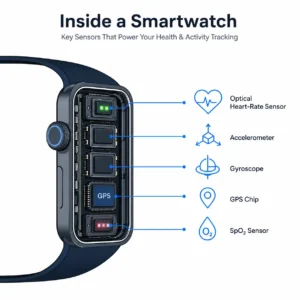
Underneath the screen, a smart watch relies on a small stack of sensors working together. An optical heart-rate sensor shines light through your skin to measure blood flow. Meanwhile, an accelerometer and gyroscope track your movement and orientation. A GPS chip pinpoints your location for outdoor runs and rides. On premium models, a SpO2 sensor also estimates blood oxygen levels.
Similarly, most watches now include a barometric altimeter for elevation. Many also add a skin-temperature sensor for cycle and recovery tracking. All of this data streams to a companion app on your phone over Bluetooth. There, it turns into the graphs and insights you actually read. For a deeper technical breakdown of each sensor, our companion guide on how smartwatches work covers the mechanics in full.
Types of Smart Watches
Not every smart watch is built for the same job. Picking the wrong category is the single biggest reason people regret a purchase. Fitness-focused watches, like the Garmin and Amazfit lines, prioritize battery life, GPS accuracy, and workout modes over flashy design. Lifestyle watches, such as the Apple Watch SE or Galaxy Watch, balance fitness tracking with apps and messaging. They also lean toward a more premium look.
Meanwhile, hybrid smart watches keep traditional analog hands but hide basic notifications and step tracking inside. They appeal to buyers who want subtlety over a full touchscreen. Finally, kids’ and senior-focused smart watches trade advanced features for safety tools like GPS location sharing and simplified interfaces. The graphic below breaks down which type usually fits which kind of buyer.
Fitness-Focused
Garmin, Amazfit. Best battery life, GPS accuracy, and workout modes.
Lifestyle
Apple Watch, Galaxy Watch. Best all-around apps, design, and notifications.
Hybrid
Analog hands with hidden tracking. Best for subtle, low-tech style.
Kids & Senior
Simplified interface with GPS safety and location sharing.
Key Features of Smart Watches
Once you’ve settled on a type, a handful of features separate a great smart watch from a disappointing one.
Battery Life
Battery life varies enormously. Some Apple Watch models last roughly 18 hours, while watches like the Garmin Vivoactive 5 or Amazfit GTR 4 run more than a week. Therefore, if you hate charging a device nightly, a longer-lasting battery should sit near the top of your checklist.
Water Resistance
Look for an official IP rating rather than vague marketing terms like “water-resistant.” The IEC’s ingress protection standard defines exactly what each rating means. Most swim-ready smart watches now carry at least a 5ATM or IP68 rating.
Health Sensors
Beyond basic heart-rate tracking, features like ECG, blood oxygen (SpO2), and skin-temperature sensing add real medical-adjacent value. That said, accuracy still varies by brand, and none of it should replace professional care.
Connectivity
Finally, decide whether you need built-in GPS for phone-free runs, LTE for calls without your phone nearby, or simple Bluetooth-only syncing. Each option affects both price and battery life.
Smart Watches vs Fitness Tracker
A fitness tracker and a smart watch look similar at a glance, but they solve different problems. A tracker focuses almost entirely on steps, sleep, and heart rate in a small, long-lasting package. A smart watch, in contrast, adds a full app ecosystem, calls, and messaging. It often adds a touchscreen big enough to actually use.
As a result, trackers tend to cost less and last longer between charges. Smart watches trade some of that battery life for genuine smartphone-adjacent functionality. If you mainly want step counts and better sleep data, a tracker may be all you need. If you also want notifications and apps on your wrist, a smart watch is worth the extra cost.
Benefits of Wearing a Smart Watch
Wearing a smart watch daily comes with benefits that go beyond convenience. First, continuous heart-rate and sleep tracking can reveal patterns you’d never notice on your own. It might flag a rising resting heart rate or inconsistent sleep. Second, built-in activity reminders and workout tracking make it easier to hit recommended movement goals. The CDC’s physical activity guidelines are a solid reference point here, recommending at least 150 minutes of moderate exercise a week for adults.
Third, hands-free notifications mean fewer phone checks throughout the day, which many wearers find reduces distraction. Finally, safety features like fall detection and emergency SOS give peace of mind, especially for older adults or solo exercisers. Overall, a smart watch works best as a quiet nudge toward healthier daily habits rather than a replacement for medical advice.
Choosing by Ecosystem: iPhone vs Android
Your phone matters more than most buyers expect when choosing a smart watch. The Apple Watch SE 3 only pairs with an iPhone, full stop, so Android owners should skip that line entirely. Samsung’s Galaxy Watch FE runs Google’s Wear OS and works best with a Samsung phone. It does pair with other Android devices too, though some features are limited.
Similarly, Wear OS itself has grown into a genuinely capable platform across brands beyond Samsung. It offers Google Assistant, Google Wallet, and Play Store apps right on the wrist. Meanwhile, brand-agnostic options like Amazfit, Garmin, and Fitbit pair with both iPhone and Android. They trade some deep ecosystem integration for flexibility. Before buying, always double-check the manufacturer’s compatibility page for your exact phone model and OS version.
Smart Watches - Price Ranges
Smart watch pricing generally splits into three tiers, shown below.
| Tier | Approx. Price | What You Get |
|---|---|---|
| Budget | ~$70–$150 | Core fitness tracking, basic notifications, usually no GPS |
| Mid-Range | ~$150–$300 | Built-in GPS, better sensors, nicer display |
| Premium | $300+ | Advanced training metrics, cellular, rugged builds |
Budget models, typically priced around $70 to $150, cover core fitness tracking with basic notifications. They usually skip GPS or advanced sensors. Mid-range watches, running approximately $150 to $300, add built-in GPS, more accurate health sensors, and a nicer display. The Fitbit Versa 4 is a good example, and this is where most mainstream buyers land. Premium and multisport watches, priced above $300, bring extras like advanced training metrics and cellular connectivity. Their rugged builds are meant for serious athletes. Consequently, most people don’t need to spend premium money unless they’re training for something specific like a marathon or triathlon.
Is a Smart Watch Worth it?
Whether a smart watch earns its price tag depends on how you’ll actually use it. If you already ignore fitness apps and rarely check notifications, a watch alone won’t create new habits for you. However, if you like data, want gentle daily nudges toward movement, or need safety features like fall detection, the investment tends to pay off quickly. You’ll gain real awareness and convenience fast.
Most owners report that the biggest value comes from sleep insights and activity reminders rather than any single flashy feature. In short, a smart watch is worth it for people who’ll actually wear it every day. It’s not worth it for those who’ll buy it and let it sit in a drawer after a week.
Our Top Picks of Smart Watches at a Glance
Ready to see exactly which models we recommend? We’ve hands-on tested five smart watches spanning every ecosystem and price point. Our full rankings are rounded up in one place.
Smart Watches - FAQs
Do smart watches work without a phone nearby?
Most smart watches need an initial phone pairing to set up accounts and sync data. Once set up, many models can track workouts, steps, and heart rate on their own, especially if they have built-in GPS. However, features like calls, texts, and app notifications typically require your phone to stay within Bluetooth range. The exception is a watch with its own LTE cellular connection. If you want a true phone-free experience for runs or gym sessions, look for a model with built-in GPS. Offline music storage helps too.
How accurate is the heart rate on a smart watch?
Optical heart-rate sensors on smart watches are generally accurate during steady-state activities like walking or light jogging. They typically land within a few beats per minute of a chest strap. That said, accuracy tends to drop during high-intensity interval training, weightlifting, or swimming. Wrist movement interferes with the sensor’s light readings in these cases. For casual tracking and trend spotting, most modern smart watches perform well enough to be genuinely useful. Athletes chasing precise numbers may still prefer a dedicated chest strap.
Do I need a subscription to use a smart watch?
Core features like step tracking, heart rate, sleep monitoring, and notifications work on virtually every smart watch without any subscription. However, some brands, including Fitbit, now place deeper insights behind an optional premium subscription. This can include detailed sleep stages or advanced readiness scores. Before buying, it’s worth checking whether the features you care about are free or gated. This varies noticeably between brands, and even between models from the same brand.
Can a smart watch replace my fitness tracker?
In almost every case, yes. A smart watch includes all the core tracking a dedicated fitness tracker offers. It also adds notifications, apps, and usually a larger, more useful display. The main trade-off is battery life. Trackers can often run over a week per charge, while many smart watches need charging every one to three days. If you truly only want basic tracking and maximum battery life, a tracker still has a place. For most people, though, a smart watch is the better all-around choice.
How long do smart watches typically last before needing a replacement?
Most smart watches remain fully functional for three to five years. Battery capacity gradually declines with age, though, similar to a phone battery. Software support is often the bigger limiting factor. Manufacturers eventually stop pushing OS updates to older models, which can affect app compatibility over time. Choosing a well-supported ecosystem and keeping the watch’s software updated both help extend its useful lifespan closer to the five-year mark.
Are smart watches safe to wear all day, including while sleeping?
Yes, the vast majority of smart watches are designed and tested for continuous, all-day and overnight wear. That’s actually required for sleep-tracking features to work. Manufacturers test their bands and sensors for prolonged skin contact. That said, wearers with sensitive skin may experience mild irritation from sweat buildup under the band. Cleaning the band regularly and giving your wrist an occasional break can help if you notice any discomfort.
Final Thoughts
A great smart watch comes down to matching three things: your phone’s operating system, the features you’ll actually use, and a price that fits your budget. It’s not the other way around. Most buyers do best starting with our full comparison guide. From there, read the individual review that matches your ecosystem and price range. Whichever model you land on, the real value shows up only if you wear it consistently. Pick the one that fits your wrist and your daily routine, not just the spec sheet.